Agentic Programming with Boozang
https://docs.boozang.com/agent/AGENT.md — your AI can read this directly for full Boozang context, concepts, workflows, and API reference.
Agentic programming refers to using AI assistants to help create, manage, and maintain automated tests. Boozang is designed from the ground up to support this paradigm.
Prerequisites
- Node.js (latest LTS version recommended) — download from nodejs.org
- npm (included with Node.js)
- A Boozang account with access to a project
Quick Start
npx bz-agent init
That's it. This generates a .bz/ directory with everything your AI assistant needs — configuration, authentication, and complete documentation (concepts, workflows, best practices, and the full MCP API reference with 40+ tools).
Setup Steps
-
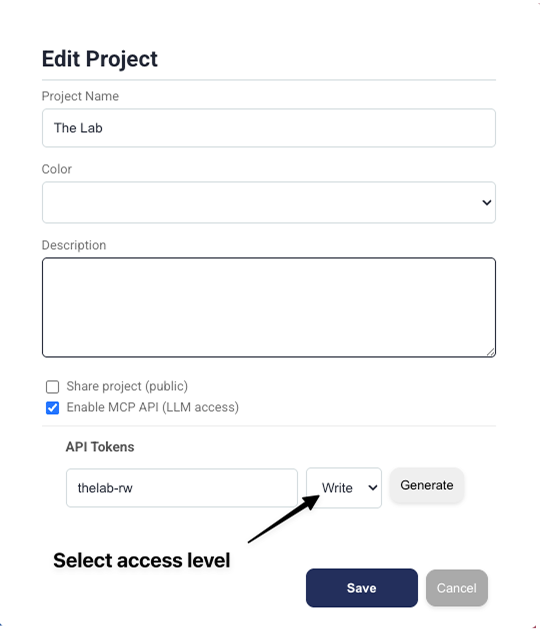
Enable the MCP API and generate a token in Boozang:
- Open your project and go to Edit Project
- Check Enable MCP API (LLM access)
- Under API Tokens, enter a token name and select the access level (Read or Write)
- Click Generate and copy the token
-
Run
npx bz-agent init— enter your server URL and token -
Point your AI assistant to
.bz/AGENT.md -
Describe your tests — the AI creates and manages them via the MCP API
What bz-agent init Creates
.bz/
├── AGENT.md          # Entry point — give this to your AI
├── config.json       # Server URL, API endpoint, version
├── .env              # Auth token (gitignored)
├── mcp-api.md        # Full API reference (40+ tools with parameters)
├── concepts.md       # Data model and terminology
├── workflows.md      # Common automation patterns
└── best-practices.md # Test design recommendations
Other Commands
npx bz-agent status     # Test connection and show config
npx bz-agent snapshot   # Cache project structure locally for AI
npx bz-agent update     # Re-render docs from latest templates
npx bz-agent parse <log> # Parse Boozang runner logs for failures
Why Boozang for Agentic Programming?
Every Web Application is a State Machine
Boozang's core insight: users don't script click sequences — they model their application's behavior. This maps naturally to how AI thinks about applications.
Natural Language Foundation
Boozang identifies elements using natural language rather than brittle CSS selectors or XPaths:
- Tests read like documentation
- AI can understand test intent from the test itself
- Changes to test descriptions map directly to UI changes
Structured Data Model
Tests follow a clear hierarchy that AI can navigate programmatically:
Company → Project → Version → Module → Test → Action
MCP API (40+ Tools)
The Model Context Protocol API gives AI agents full control:
- Module/Test/Action CRUD — create, read, update, delete at every level
- Environment management — create, provision, configure test environments
- IDE control — navigate, run tests, get screenshots, set breakpoints
- Auth configuration — manage authentication settings
Two Ways to Get Started
| Approach | Best for | What to do |
|---|---|---|
npx bz-agent init | Project-specific setup | Run in your project directory. AI reads local .bz/AGENT.md |
| Public URL | Quick one-off help | Give your AI: https://docs.boozang.com/agent/AGENT.md |
Both provide the same documentation. The CLI approach adds project-specific config and authentication.
Next Steps
- AI Integration - Detailed integration methods and best practices
- MCP API Reference - Overview of all available tools
- Full API Specification - Complete parameters, examples, and retry policies