Introduction
To connect to an external CI server using Boozang, you'll need to use the Docker test runner (styrman/boozang-playwright). Boozang can automatically generate the script code needed to get this up and running. The script can then be customized to suit your particular setup.
Docker Test Runner
The recommended approach is using the styrman/boozang-playwright Docker image, which packages Playwright with Xvfb for headless browser execution.
docker run --rm --shm-size=1g \
  -v "$(pwd):/var/boozang/" \
  styrman/boozang-playwright \
  "https://ai.boozang.com/extension?token=TOKEN#PROJECT/VERSION/MODULE/TEST/run"
Runner Options
| Option | Description |
|---|---|
--file=name | Report filename (default: "report") |
--screenshot | Capture screenshot after test |
--video=on|off|none | Video recording mode |
--keepalive | Keep browser alive after completion |
--testreset | Reset test before execution |
--width=1280 | Browser viewport width |
--height=1024 | Browser viewport height |
--loglevel=LEVEL | Log level (error/warning/info/debug/log) |
--device=NAME | Emulate a specific device |
--timeout=SEC | Command timeout in seconds |
Exit Codes
| Code | Meaning |
|---|---|
0 | Tests succeeded |
1 | Tests failed |
2 | Error (invalid URL, missing token, etc.) |
Reports and screenshots are written to /var/boozang/ inside the container. Mount this path to a local directory to access them.
Generating the integration code
To get started, visit the CI sidebar option in the Boozang tool.
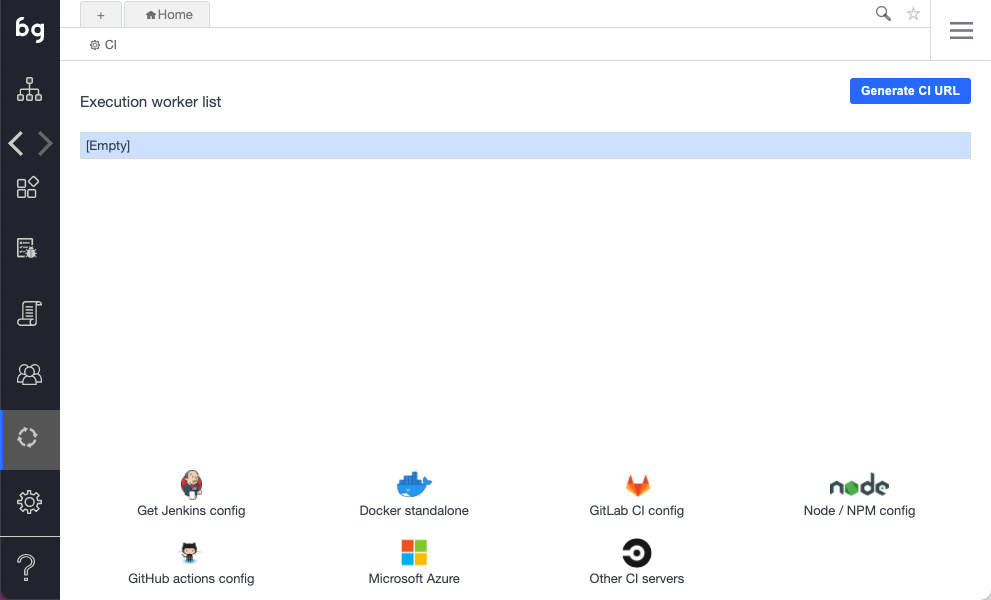
The following options are supported:
- Jenkins: Boilerplate Jenkins script code based on the Docker runner
- Docker stand-alone: Create your own Docker-based runner
- GitLab CI config: Boilerplate code based on the Docker runner
- GitHub Actions config: Boilerplate code based on the Docker runner
- Microsoft Azure: Sample boilerplate code based on the Docker runner
- Other CI server: Sample boilerplate code based on the Docker runner